This is the second post in a series of personal notes about using the HumanWare BrailleNote Apex with FreeBSD.
2) HumanWare BrailleNote Apex and FreeBSD via USB. <- This post
1) Exploring the HumanWare BrailleNote Apex with FreeBSD.
The previous post covers the features of the Apex, the conventions for Braille characters (aka patterns), and the first connection to FreeBSD through a USB cable in USB Serial mode.
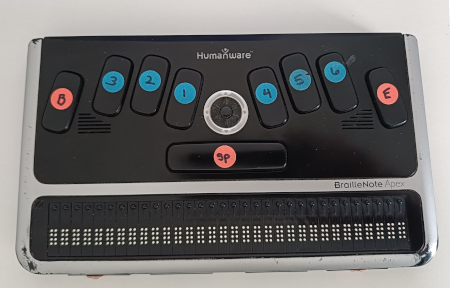
This post does not yet cover using the Apex as a fully functional Braille display. It describes how to:
- Establish USB communication between the device and FreeBSD.
- Receive bytes from the device and read them on FreeBSD.
- Send bytes from FreeBSD to the device.
This post includes images and tables. If they are not accessible to you, I can provide a plain-text version by email or through the FreeBSD accessibility mailing list.
USB connection
In the previous post we connected the Apex to FreeBSD with a USB cable. We set the Apex to terminal for screen reader mode, using USB Serial. FreeBSD received the bytes sent by the Apex for each key pressed, and it sent back data to raise the dots of the braille cells.
In this post we will keep the same USB cable and the same terminal for screen reader mode, but we will use USB Client instead of USB Serial.
Setting up the Apex
There are two ways to enable the terminal for screen reader mode with USB Client.
1. Navigating through the menus
- Press
SPACE + {123456}to open the Main Menu. - Press
Next ThumborSPACErepeatedly until you reach Terminal for Screen Reader. - Press
ENTERto check the current setting. - If the current setting is not Braille Terminal port currently USB client,
press
u {136}to select USB Client. The Apex announces USB Client. - Press
ENTERto confirm. You should hear a beep and read braille terminal on the cells.
2. Using shortcuts
- Press
SPACE + {123456}to open the Main Menu. - Press
t {2345}to go directly to the Terminal for Screen Reader setting and hear the current value. - If the current setting is not Braille Terminal port currently USB client,
press
u {136}to select USB Client. The Apex announces USB Client. - Press
ENTERto confirm. You should hear a beep and read braille terminal on the cells.
I noticed that the beep sounds a bit distorted if the Apex is already connected to FreeBSD via USB. If the Apex is not connected, the beep is higher-pitched. I don’t know whether this is an intended feature, so it should be verified. It is also worth checking whether the same behavior occurs with USB Serial.
Attaching the Apex to FreeBSD
Connect the Apex to your FreeBSD laptop via USB.
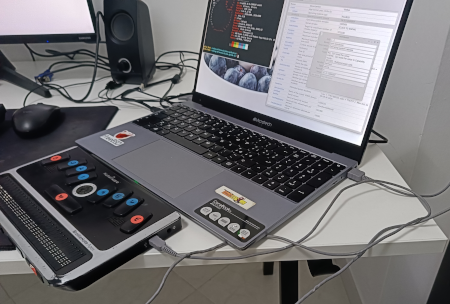
Now run dmesg(8):
...
ugen0.5: <HumanWare Apex USB Serial Port> at usbus0
FreeBSD recognizes the device only as the generic ugen0.5.
No specific driver attaches to it.
The dmesg line gives us three pieces of information:
ugen0.5is the device name: USB address 5 on the bususbus0.HumanWare Apex USB Serial Portis built from the manufacturer and product strings reported by the device itself.- There is no line from a specific driver such as
umodemoruftdi, so nothing has claimed the device yet.
Note that the product string says USB Serial Port, although the Apex is set to USB Client. The strings reported by the device do not tell us which of the two modes is active.
Inspecting the USB descriptors
USB devices provide the host with a set of descriptors. These describe the device and identify the interfaces and endpoints it exposes. Then we can check which driver, if any, owns them. This is the information we need to understand how to talk to the Apex.
The dmesg output gave us the device name, ugen0.5.
First, we confirm it with usbconfig(8):
# usbconfig list
...
ugen0.5: <Braille Note Apex (braille terminal mode) Humanware Inc> at usbus0, cfg=0 md=HOST spd=HIGH (480Mbps) pwr=ON (0mA)
Here is what each field tells us:
ugen0.5is the same device name seen in dmesg.- The description in angle brackets is the product name and the vendor name, here Braille Note Apex (braille terminal mode) by Humanware Inc. usbconfig does not read these names from the device. It looks them up in its vendor and product database, which is why they differ from the strings printed by dmesg.
at usbus0is the USB bus the device is connected to.cfg=0is the index of the active configuration.md=HOSTmeans that the laptop is acting as the USB host.spd=HIGH (480Mbps)means that the Apex is connected at high speed.pwr=ON (0mA)means that the port is powered and that the device declares no current drawn from the bus.
Next, we read the device descriptor to identify the device:
# usbconfig -d ugen0.5 dump_device_desc
ugen0.5: <Braille Note Apex (braille terminal mode) Humanware Inc> at usbus0, cfg=0 md=HOST spd=HIGH (480Mbps) pwr=ON (0mA)

  bLength = 0x0012
  bDescriptorType = 0x0001
  bcdUSB = 0x0200
  bDeviceClass = 0x0020  <Unknown>
  bDeviceSubClass = 0x0000
  bDeviceProtocol = 0x0000
  bMaxPacketSize0 = 0x0040
  idVendor = 0x1c71
  idProduct = 0xc004
  bcdDevice = 0x0090
  iManufacturer = 0x0001  <HumanWare>
  iProduct = 0x0002  <Apex USB Serial Port>
  iSerialNumber = 0x0003  <28171312-0031-0000-0000-000000000000>
  bNumConfigurations = 0x0001
The most useful fields are:
bcdUSB = 0x0200: the device follows the USB 2.0 specification.bDeviceClass = 0x0020:usbconfigreports this value asUnknown. I have not identified the corresponding device class. Subclass and protocol are zero, so this descriptor does not provide enough information to identify a driver at device level.bMaxPacketSize0 = 0x0040: the control endpoint 0 accepts packets of up to 64 bytes.idVendor = 0x1c71andidProduct = 0xc004: the vendor and product IDs. A driver uses them to match the device. The vendor ID0x1c71is registered to Humanware Inc. The USB ID database entry for0xc004is Braille Note Apex (braille terminal mode), the same name that usbconfig prints.bcdDevice = 0x0090: the release number of the device, 0.90.iManufacturer,iProductandiSerialNumber: the strings HumanWare, Apex USB Serial Port and the serial number.bNumConfigurations = 0x0001: the device has a single configuration.
Then we read the configuration descriptor to see interfaces and endpoints:
# usbconfig -d ugen0.5 dump_all_config_desc
ugen0.5: <Braille Note Apex (braille terminal mode) Humanware Inc> at usbus0, cfg=0 md=HOST spd=HIGH (480Mbps) pwr=ON (0mA)


 Configuration index 0

    bLength = 0x0009
    bDescriptorType = 0x0002
    wTotalLength = 0x0027
    bNumInterfaces = 0x0001
    bConfigurationValue = 0x0001
    iConfiguration = 0x0000  <no string>
    bmAttributes = 0x00c0
    bMaxPower = 0x0000

    Interface 0
      bLength = 0x0009
      bDescriptorType = 0x0004
      bInterfaceNumber = 0x0000
      bAlternateSetting = 0x0000
      bNumEndpoints = 0x0003
      bInterfaceClass = 0x0002  <Communication device>
      bInterfaceSubClass = 0x00ff
      bInterfaceProtocol = 0x00ff
      iInterface = 0x0000  <no string>

     Endpoint 0
        bLength = 0x0007
        bDescriptorType = 0x0005
        bEndpointAddress = 0x0081  <IN>
        bmAttributes = 0x0002  <BULK>
        wMaxPacketSize = 0x0200
        bInterval = 0x0000
        bRefresh = 0x0000
        bSynchAddress = 0x0000

     Endpoint 1
        bLength = 0x0007
        bDescriptorType = 0x0005
        bEndpointAddress = 0x0002  <OUT>
        bmAttributes = 0x0002  <BULK>
        wMaxPacketSize = 0x0200
        bInterval = 0x0000
        bRefresh = 0x0000
        bSynchAddress = 0x0000

     Endpoint 2
        bLength = 0x0007
        bDescriptorType = 0x0005
        bEndpointAddress = 0x0083  <IN>
        bmAttributes = 0x0003  <INTERRUPT>
        wMaxPacketSize = 0x0040
        bInterval = 0x000c
        bRefresh = 0x0000
        bSynchAddress = 0x0000
The configuration descriptor tells us the following:
bNumInterfaces = 0x0001: the device exposes a single interface.wTotalLength = 0x0027: the whole configuration is 39 bytes long (9 for the configuration, 9 for the interface, 3 x 7 for the endpoints).bmAttributes = 0x00c0andbMaxPower = 0x0000: the device is self-powered and requests no current from the bus. This matches the0mAshown by usbconfig.bInterfaceClass = 0x0002is the Communication device class, but subclass and protocol are both0x00ff, which means vendor-specific. This is not a standard CDC ACM interface, so the generic serial driver umodem(4) does not match it.- The interface has three endpoints:
0x81, bulk IN, up to 512 bytes per packet: data from the Apex to FreeBSD.0x02, bulk OUT, up to 512 bytes per packet: data from FreeBSD to the Apex.0x83, interrupt IN, up to 64 bytes per packet, polled about every 256 ms (bInterval = 12at high speed): probably used for status or notifications.
Other usbconfig commands do not add new information.
usbconfig -d ugen0.5 dump_info prints only the header line already shown by
the other commands.
usbconfig -d ugen0.5 dump_curr_config_desc and
usbconfig -d ugen0.5 dump_all_desc repeat the descriptors already shown,
because the device has a single configuration.
Finally, we check which driver owns the interface.
The show_ifdrv command shows the driver attached to each interface:
# usbconfig -d ugen0.5 show_ifdrv
ugen0.5: <Braille Note Apex (braille terminal mode) Humanware Inc> at usbus0, cfg=0 md=HOST spd=HIGH (480Mbps) pwr=ON (0mA)
The output contains only the header line.
No driver is attached to interface 0, which confirms what the descriptors
suggested.
The Apex is not claimed by any kernel driver, so for now we can reach it only
through the generic ugen device.
Receiving data from the Apex on FreeBSD
The next step is to see which bytes the Apex sends to FreeBSD when a key is pressed.
I tried # usbdump -i usbus0 -f 5 -v, as I did for USB Serial, to see the
data sent by the Apex.
However, I did not get any useful output.
I also tried other options, without success.
I will investigate this further in the future.
The previous commands already gave me everything I need:
VID 0x1c71, PID 0xc004 and the bulk IN endpoint 0x81.
So I can use libusb directly.
To see what is sent when a key is pressed, I used apex-keys.c:
#include <err.h>
#include <libusb.h>
#include <stdint.h>
#include <stdio.h>

#define VID    0x1c71
#define PID    0xc004
#define EP_IN  0x81

int
main(void)
{
	libusb_device_handle *h;
	uint8_t buf[512];
	int i, n, nl, error;

	if (libusb_init(NULL) != 0)
		errx(1, "libusb_init");

	h = libusb_open_device_with_vid_pid(NULL, VID, PID);
	if (h == NULL)
		errx(1, "Apex not found");

	if (libusb_claim_interface(h, 0) != 0)
		errx(1, "claim interface");

	printf("Press keys on the Apex (Ctrl-C to quit)\n");

	nl = 0;
	for (;;) {
		error = libusb_bulk_transfer(h, EP_IN, buf, sizeof(buf), &n,
		    1000);

		if (error == LIBUSB_ERROR_TIMEOUT)
			continue;
		if (error != 0)
			errx(1, "bulk in: %s", libusb_error_name(error));

		for (i = 0; i < n; i++) {
			printf("0x%02x%c", buf[i], nl ? '\n' : ' ');
			nl = !nl;
		}
		fflush(stdout);
	}

	return (0);
}
We compile and run the tool to see what is sent to the FreeBSD laptop when we press a key.
# cc apex-keys.c -o apex-keys -lusb
# ./apex-keys
Press keys on the Apex (Ctrl-C to quit)
0x80 0x01
0x80 0x02
0x80 0x04
0x80 0x08
0x80 0x10
0x80 0x20
...
After the first tests it was clear that two bytes are sent for each key or combination of keys.
The key map is the same as for USB Serial:
| Key | Byte 1 | Byte 2 |
|---|---|---|
| Braille dots 1-6 | 0x80 |
pressed keys bitmap |
| BACKSPACE | 0x82 |
0x40 | dots pressed keys bitmap |
| SPACE | 0x81 |
0x00 | dots pressed keys bitmap |
| ENTER | 0x83 |
0x00 | dots pressed keys bitmap |
| Scroll Wheel Button | 0x8B |
0x06 |
| Scroll Wheel Right | 0x8B |
0x01 |
| Scroll Wheel Left | 0x8B |
0x00 |
| Thumb key 1 PREVIOUS | 0x84 |
0x01 |
| Thumb key 2 BACK | 0x84 |
0x02 |
| Thumb key 3 ADVANCE | 0x84 |
0x04 |
| Thumb key 4 NEXT | 0x84 |
0x08 |
Sending data from FreeBSD to the Apex
The next step is to send characters/bytes from the laptop to the Apex and make the corresponding Braille dots rise on the display.
I used libusb to send <0x1b, 'B'> (ESC B), followed by one byte for each
cell.
Sometimes, especially at the beginning, the Apex did not raise the dots.
As a temporary workaround, very similar to what I did with USB Serial,
I first send the query <0x1b, '?'> (ESC ?).
The Apex replies with 0x86 0x00 0x20. In these tests, 0x86 identifies
the reply, followed by the number of status cells (0x00) and the number of
text cells (0x20, or 32).
Of course, a closer investigation is needed in the future to make the
communication more stable and efficient.
#include <err.h>
#include <libusb.h>
#include <stdint.h>
#include <string.h>

#define VID      0x1c71
#define PID      0xc004
#define EP_IN    0x81
#define EP_OUT   0x02

int
main(void)
{
	libusb_device_handle *h;
	uint8_t buf[512];
	int n, error;
	uint8_t query[] = {
		0x1b, '?'
	};
	uint8_t dots[] = {
		0x1b, 'B',
		0x20, 0x13, 0x11, 0x07, 0x07, 0x15, 0x00,
		0x20, 0x3a, 0x15, 0x17, 0x07, 0x19, 0x02, 0x00,
		0x20, 0x0b, 0x17, 0x11, 0x11, 0x20, 0x03, 0x20, 0x0e, 0x20, 0x19, 0x16,
		0xff, 0xff, 0xff, 0xff, 0xff
	};

	if (libusb_init(NULL) != 0)
		errx(1, "libusb_init");

	h = libusb_open_device_with_vid_pid(NULL, VID, PID);
	if (h == NULL)
		errx(1, "Apex not found");

	if (libusb_claim_interface(h, 0) != 0)
		errx(1, "claim interface");

	/* Query: ESC ? -> 0x86 <status cells> <text cells> */
	error = libusb_bulk_transfer(h, EP_OUT, query, sizeof(query), &n, 1000);
	if (error != 0)
		errx(1, "bulk out: %s", libusb_error_name(error));

	error = libusb_bulk_transfer(h, EP_IN, buf,
	    sizeof(buf), &n, 2000);
	if (error != 0)
		errx(1, "bulk in: %s", libusb_error_name(error));

	if (n < 3 || buf[0] != 0x86)
		errx(1, "unexpected Apex response");

	if (buf[2] != 32)
		errx(1, "invalid cell count: %d", buf[2]);

	/* Display pattern: ESC B + one byte per cell */
	error = libusb_bulk_transfer(h, EP_OUT, dots, sizeof(dots), &n, 1000);
	if (error != 0)
		errx(1, "bulk out: %s", libusb_error_name(error));

	libusb_release_interface(h, 0);
	libusb_close(h);
	libusb_exit(NULL);
	return (0);
}
In English UEB Grade 1, the text is represented by the following Braille cells.
Capital letters are preceded by the capital indicator {6}.
H {6}{125} e {15} l {123} l {123} o {135} SPACE {}
W {6}{2456} o {135} r {1235} l {123} d {145} , {2} SPACE {}
F {6}{124} r {1235} e {15} e {15} B {6}{12} S {6}{234} D {6}{145} ! {235}
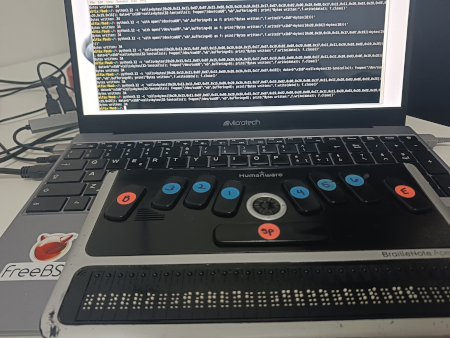
The successful tests confirm that I can send raw Braille cell patterns from FreeBSD to the Apex over its USB interface. They also provide a starting point for implementing the output side of a native FreeBSD driver.
Comparing USB Serial and USB Client
It is interesting to compare the two terminal for screen reader modes, USB Serial and USB Client. This information is needed to write a driver or a utility for the Apex.
The following table summarizes the differences and the similarities. Same in the last column means that the value is identical to the one in the USB Serial column.
| USB Serial mode | USB client mode | |
|---|---|---|
| USB ID | 045e:00ce | 1c71:c004 |
| iManufacturer | Generic Manufacturer (PROTOTYPE–Remember to change idVendor) | HumanWare |
| iProduct | Generic Serial (PROTOTYPE–Remember to change idVendor) | Apex USB Serial Port |
Name shown by usbconfig list |
Generic PPC Flash device Microsoft Corp. | Braille Note Apex (braille terminal mode) Humanware Inc |
| iSerial | 28171312-0031-0000-0000-000000000000 | Same |
| bcdUSB | 2.00 | Same |
| bcdDevice | 0.00 | 0.90 |
| bDeviceClass | 0x00 (probed by interface class) | 0x20 |
| Interface class | ff/ff/ff (vendor specific) | 02 (communication device), subclass/protocol ff/ff |
| wTotalLength | 0x20 | 0x27 |
| Speed | High (480 Mbps) | Same |
| Power | Self powered (bmAttributes 0xc0), bMaxPower 0 | Same |
| Endpoints | 2 bulk (0x81 IN, 0x02 OUT), 512 bytes | The same two, plus interrupt IN 0x83 (64 bytes, bInterval 12) |
| FreeBSD driver | uipaq(4), uipaq0 | No driver attached (ugen0.5 only, show_ifdrv is empty) |
dmesg |
ugen0.5: <Generic Manufacturer (PROTOTYPE--Remember to change idVendor) Generic Serial (PROTOTYPE--Remember to change idVendor)> at usbus0uipaq0 on uhub1uipaq0: <Generic Manufacturer (PROTOTYPE--Remember to change idVendor) Generic Serial (PROTOTYPE--Remember to change idVendor), class 0/0, rev 2.00/0.00, addr 4> on usbus0 |
ugen0.5: <HumanWare Apex USB Serial Port> at usbus0 |
| Device node | /dev/cuaU0 | Access via libusb (bulk 0x02/0x81) |
ESC ? |
Works: reply 86 00 20 |
Same |
ESC B + cells |
Works, the dots are raised | Same |
| Keys | 80 <dot bitmap> |
Same |
What the fields mean
USB ID is the vendor ID and product ID pair (VID:PID). The host uses it to recognize a device.
iManufacturer and iProduct are string descriptors stored in the
device.
They are what dmesg prints.
Name shown by usbconfig list is not read from the device.
usbconfig looks up the VID:PID pair in its vendor and product database,
so the name can differ from the descriptor strings.
iSerial is the serial number string descriptor.
bcdUSB is the USB specification release that the device claims to support.
bcdDevice is the device release number, which usually changes with the hardware or firmware revision.
bDeviceClass is the class declared at device level.
0x00 means that the class is defined per interface, so the host probes
the interface class.
Interface class is the class, subclass and protocol of the interface.
ff/ff/ff means vendor specific.
wTotalLength is the size in bytes of the configuration descriptor, including its interface and endpoint descriptors.
Speed and Power describe the link speed and the power attributes
(bmAttributes, bMaxPower).
Endpoints lists the data pipes of the interface. Bulk endpoints carry the data stream. An interrupt endpoint is meant for small, periodic transfers.
FreeBSD driver and dmesg show what the kernel attaches to the
device and what it prints at attach time.
Device node is how a program reaches the device.
What we notice
The two modes present very different USB identities. USB Serial mode uses the Microsoft vendor ID 045e, a vendor-specific interface and generic strings. Those strings still say “PROTOTYPE–Remember to change idVendor”. This suggests a stock firmware that was never customized. USB Client mode uses the HumanWare vendor ID 1c71 and a communication-class interface.
The USB Client interface has class 2 but subclass and protocol ff/ff.
So it is not a standard CDC ACM interface, and the generic umodem(4) driver
does not match it.
As show_ifdrv shows, no other driver claims it either.
This is why we use libusb to talk to it.
In USB Serial mode the vendor-specific interface is claimed by uipaq(4).
It creates /dev/cuaU0.
The only difference between the endpoints of the two modes is the extra
interrupt endpoint 0x83 in USB Client mode.
The wTotalLength values agree with this.
They are 32 bytes for two endpoints and 39 bytes for three.
Each configuration has 9 bytes for the configuration descriptor, 9 bytes for
the interface descriptor and 7 bytes for each endpoint.
Both modes have the same two bulk endpoints of 512 bytes.
The serial number string is identical in both modes. It is also identical to the one in a 2013 BRLTTY mailing list post. So this string is most likely a fixed value of the model or of the firmware, and not a unique serial number.
The braille protocol is the same in both modes.
ESC ? is answered with 86 00 20 in both cases.
ESC B followed by the cells raises the dots.
So the interrupt endpoint was not needed for the operations tested so far.
A driver for USB Client mode can match 1c71:c004 directly. In USB Serial mode the VID:PID pair 045e:00ce is a generic Microsoft ID, probably shared with other devices. So the serial string could be a useful extra check to recognize the Apex, but it should be verified on more units.
What comes next
This post, too, describes only the first steps towards using the device. The next step is to exchange actual characters, rather than just raw bytes, between the laptop and the Apex, probably using conversion tables. liblouis is available in the FreeBSD Ports Collection and could be a useful option. Eventually, a dedicated utility could be developed to establish and manage the communication.
Exploring a Bluetooth connection could also be interesting, as an optional feature rather than a priority.
Once communication is more reliable and a utility for testing and debugging the device is available, I plan to document the work on the FreeBSD Wiki.
